Only for GDS by GDS - India Post

Only for GDS by GDS - India Post
Showing posts with label Arrears. Show all posts

Monday, 20 August 2018

GDS Pay Arrears - Dissatisfaction

Attention to all GDS :


Arrear calculation : Received arrears are not according to Kamalesh Chandra Committee Recommendations.

As per Report:
One BPM with a scale of 2745/-
As per the recommendations , he will be placed in Rs.12,000 (level 1 BPM scale & 4 hours ) .

But before implementation of Report his working hours is only 3 hours.

So, for arrear calculation , one must have considered the scale ( actual working hours i.e; 3 hours ) for the period between 1.1.2016 and date of effect is exactly Rs.9,000/-.

So, Rs.9,000- Basic+DA as on month will be the arrears for GDS.

But, DoP modified the previous arrears calculation method by receiving the order from PMO.

PMO directed DoP to modify and submit re calculation of arrears procedure.

As per present implemented orders of GDS Arrears , DoP issued following procedure which is illegal
Basic pay ×2.57 - Basic +DA.
2.57 fitment factor is only for finalising new wage scales. It is not applicable to arrears.

Arrears calculation is clearly related to new wage scales - basic+DA.

Due to irregular and illegal formula applied by DoP, nearly Rs.3,100 crores loss to GDS.

This issue can be challenged in the Court of Law.

This article written by 
Ch.Laxmi Narayana, Circle Secretary-AP, NUGDS.

Monday, 2 July 2018

Arrears calculator for GDS Employees

The GDS pay scale has been revised by the Seventh Pay Commission and consequent on this, payment of proportionate arrears has become due.  In order to help the offices using Meghdoot Accounts in this job, a new application titled GDSArrears.exe is designed to work as an extension of the main accounts module.

Please note that this application can be used to draw arrears to GDS only on account of seventh pay commission implementation.  

Please download the GDSArrears.exe along with the Config.xml file and copy it to any location in the system. First time when you are running the exe then it will prompt to enter the server name where accounts database resides. Give the accounts server name. Now the application is ready for use. To enter the server name manually, open the Config.xml file with notepad and enter the name of the server where the Accounts database resides. Alternatively, you can copy the exe to the folder where Accounts is installed in which case, the application can be executed easily. 

Process of arrears calculation

Double click the GDSArrears.exe to launch the application.  In the login screen, the user name as available in the accounts module is exhibited.  You can select a user, enter the password and login.  

In the arrears calculator dialog box, select the official, the period from and to applicable (the default period that is from January 2016 to June 2018 is displayed).  Please note that you have to select only the eligible GDS officials for calculation as it will be displaying retired GDS officials also.  

The list of officials available includes those who have been deleted between January 2016 and June 2018 on account of retirement, death, dismissal etc and their name appears with remarks Retired in brackets.  In such cases, if a new incumbent joined the post in the middle of the period above (between 1.1.2016 and 30.06.2018), first select the employee who ceases to exist, upto the specified date, select the period and draw the arrears in the steps explained below.  Next, select the new incumbent and set the subsequent period upto June 2018.  In this case, the month of increment appears as the month of joining.  Please ensure that the month of increment correctly appears and if not so, correct the same.  The other process to continue from this point.

For the official whose first salary drawn later then Jan 2016 old basic and Increment month should be entered manually. 

The existing pay scale, pay in the pre-revised scale, the corresponding month of increment, designation, Post etc., are displayed automatically.  Check for the correctness of these and make modifications if required, click Insert button and click Submit button.  The calculation of arrears is displayed.  Click the Save button to save the details for the official.  

If any of these figures have to be altered, click the Modify tab, select the employee concerned, click Fetch button, select the month for which change is required and click Edit button.  Figures are displayed for editing.  Afford the appropriate changes and click the Update button to save the changes.  While modifying, if the LWA for a period has to be entered which was not there in the original bill, the number of days can be entered and the arrears for this will be modified automatically.  Please note that Dies-Non transactions are also included in LWA while calculating arrears. Check whether the details are correct or not and through Modify Tab necessary changes have to be made if the data is incorrect. Repeat the calculation process for all the eligible officials and on completion click the Reports tab to proceed further.  Please note that the arrear bills for all the eligible employees will have to be calculated in a single bill and separate bill for individual cases cannot be generated.

Before proceeding further, ascertain the next bill number to be assigned for the arrears bill.  In the Reports dialog box, click the Drawl of Arrears, enter the sanction number and bill number and click the Draw button.  The arrears bill is now created.  Acquittance rolls for this bill can be generated in the other bills module. Retired/ Promoted Officials details will not go directly to Other Bills Module. Acquittance Rolls for these employees has to be prepared separately.

You can generate the Detailed Arrears Report and Individual Report for each employee which displays the total amount of arrears thereof payable now. For Retired/ Promoted Officials, separate report is there. 
Please note that, once the Acquittance rolls are prepared in other bills module of Meghdoot Accounts for any employee, Arrears details of that employee cannot be saved/ modified again. So be sure that all the details are correct before preparing Acquittance Rolls.

If increment amount is not reflecting in the old basic, please check appeared basic pay is matching with the scale selected.

If you have changed charged month next to same and prepared some bills then again changed to Next to same month, arrears will not calculated correctly. You need to manually calculate and edit through modify option 


Wednesday, 27 June 2018

GDS Arrears Calculation is illegal. Govt Needs to be Considered

As per Kamalesh Chandra Committee Recommendations regarding Arrears for GDSBPM having TRCA of Rs.4575/- will receice Rs.1,25,000/-

But as per order released by DoP on 25.06.2018 the same GDSBPM will receice only Rs.30,821/-

Before implementation date , if a GDSBPM whose TRCA is 1 i.e, Rs.2745/ ( three hours work ) he will automatically inserted in level 1 of new wage scale of BPM with four hours work ( Rs.12,000/- ).

For Arrear calculation , chairman GDS Committee recommended corresponding scale for actual working hours between 1.1.2016 to implementation date based on the proposed scales.

i.e, for 4 hours : Rs.12,000 (proposed scale after implementation ) for 3 hours actual working hours during period : Rs.3,000.

So, as per recommendations of Committee 2745 Basic GDSBPM corresponding scale for arrear calculation is Rs.9,000.
As on 1.1.2016 Basic : Rs.2745/-
DA : 125% i.e, Rs.3431
Basic+DA : 2745+3431 = Rs.6176
Arrear for one month = 9,000-6176 = Rs.2824.
for 30 months = 2824×30 = Rs.84720/-

But as per Dop order dated 25.06.2018

Basic : 2745
fitment : 2.57
Total : 7055
Basic + DA = 2745+3431= 6176
Arrear for one month : 7055-6176 = Rs.879
for 30 months = 879×30 = 26,370.

Difference between recommendation and DoP order = 84720 - 26370 = Rs.58,350/-

This practice of calculation of arrears is illegal.

CH.Laxmi Narayana

Tuesday, 26 June 2018

GDS Arrears calculation for 11 TRCA Slab whose annual increment is on 1st January


Easy GDS revised pay arrear calculator

Easy Arrears Calculation:-

 01.01.2016 to 30.6.2016  
=Basic TRCA ×0.32×6

01.07.2016 to 31.12.2016 
   =Basic Trca×0.25×6

01.01.2017 to 30.6.2017 
 =Basic TRCA ×0.21×6

01.07.2017 to 31.12.2017 
    =Basic Trca×0.18×6

01.01.2018 to 30.6.2018 
  =Basic TRCA ×0.15×6


Multiple factor details
0.32=2.57-2.25 (125%DA )
0.25=2.57-2.32 (132%DA )
0.21=2.57-2.36 (136%DA )
0.18=2.57-2.39 (139%DA)
0.15=2.57-2.42 (142%DA)

For Example:-

 GDSMD BASIC TRCA ON 01.01.2016 RS 4220

01.01.2016 to 30.6.2016  =                      4220×0.32×6= 8102

01.07.2016 to 31.12.2016 
  =4220×0.25×6=6330

01.01.2017 to 30.6.2017  
=4295×0.21×6=5442

01.07.2017 to 31.12.2017 
  =4295×0.18×6=4639

01.01.2018 to 30.6.2018 
 =4370×0.15×6=3993

Totals Arrears for 30 months 
Rs 28506.00

Wednesday, 6 June 2018

GDS Arrear Table for BPM & GDS


GDS officials will get Arrears from 01.01.2016

Congratulations to all the GDS Brothers and sisters. Your hard work and perseverance has given you the long delayed fruits.

Hon. Minister has tweeted that the arrears will be Paid from 1st january 2016 in a single installment. Read the tweet below.
Arrears with effect from 1st January 2016 will be in a single instalment.#ModiforGDS— Manoj Sinha (@manojsinhabjp) June 6, 2018
There cannot be more good news than this.


Read more tweets related to this matter from Hon Minister below.
New Time Related Continuity Allowance (TRCA) slabs from Rs 2295 to Rs 10,000; from Rs 2745 to Rs 12,000; from Rs 4115 to Rs 14,500.#ModiforGDS
— Manoj Sinha (@manojsinhabjp) June 6, 2018
Average increase of more than 55% in the wages of GDSs, benefiting more than 2.60 lakh GDSs and their family members. A sensible government in the service of the inspiring people of India.#ModiforGDS— Manoj Sinha (@manojsinhabjp) June 6, 2018
Dearness Allowance to GDSs will be paid as a separate component, and will be revised in line with revisions made for government employees.#ModiforGDS— Manoj Sinha (@manojsinhabjp) June 6, 2018

Sunday, 29 April 2018

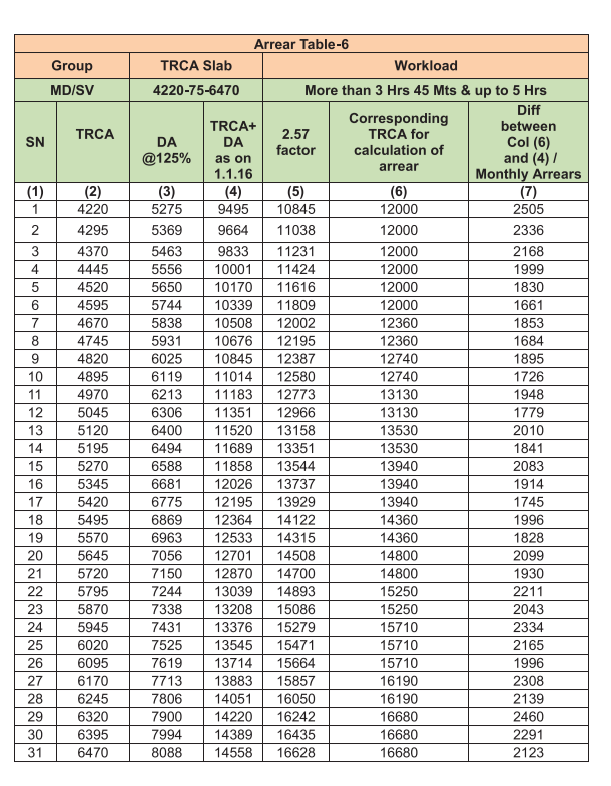
Recommended GDS Arrear Table By GDS Pay Committee 2016

GDS Committee 2016 has Recommended 11 GDS Arrear Table to calculate the arrears of Gramin Dak Sevak. Committee (Kamalesh Chandra Committee) marge the 11 TRCA slab into 3 New Wages Scale which shows below mention minimum pay.
Wages Scale 1 – 10,000/-
Wages Scale 2 – 12,000/-
Wages Scale 3 – 14,500/-

We all know that GDS Committee 2016 will implemented on 01.01.2016 but still now GDS pay has counted on Nataraja Murti Committee 2007 (GDS Pay Committee 2007. So, we need to that how much Arrears GDS will get? . By following the Recommended GDS Arrears By GDS Pay Committee 2016 you can calculate yourself.

Step to follow –
First check your basic pay on your respective Pay slab (for example you can follow this 2295-45-3695) as on 01.01.2016. and add 125% DA with Basic. If your basic 2295 adding 125% your pay will be 5164/-
If Government take just 2.57 multiple factor then pay will be 5898/- but committee recommended beyond the 7th Pay Commission multiple factor which is minimum 10,000/-
Now you need to calculate the difference between your pay (which u got on or before 01.01.2016) and corresponding TRCA for calculation of Arrears (Below Table).
In this case the monthly arrears will be 7500-5164=2366/-
Now you need to calculate your total arrears. January 2016 to April 2018 total month 28. i.e 2366*28=65,408/-

[Note : If you got minimum payment then you can get maximum arrears as per committee recommendation.]Recommended GDS Arrear Table – 1


[You Can Read :


Recommended Pay By GDS Pay Committee 2016
Recommended Allowance By GDS Pay Committee 2016]Recommended GDS Arrear Table – 2Recommended GDS Arrear Table – 3


[Read More :-


GDS Committee Major Recommendation


Gramin Dak Sevak Salary 2018]Recommended GDS Arrear Table – 4Recommended GDS Arrear Table – 5Recommended GDS Arrear Table – 6Recommended GDS Arrear Table – 7Recommended GDS Arrear Table – 8Recommended GDS Arrear Table – 9Recommended GDS Arrear Table – 10Recommended GDS Arrear Table – 11

Thursday, 19 January 2017